Here is a small question that sent me down a rabbit hole: what happens when two copies of your service start at the same time, and both try to update the database schema?
If you only run migrations by hand, you may never have to think about this. But the moment you run more than one instance of a service, it becomes a real problem.
This post is about Vow, a small database migration runner I wrote in Go for PostgreSQL. It started as a part of my task queue project, Dhara, and I later pulled it out into its own library. I’ll explain what a migration runner does, how Vow works step by step, and the design choices behind it.
Code: github.com/Md-Talim/vow
Why I built it
Honestly, I wasn’t missing a tool. I had already used migration tools like Goose and Flyway, and they work fine.
I built Vow because I wanted to see what happens underneath the abstraction. You run one command, and your database schema is magically up to date. How? What is it actually doing? That’s the same reason I built Redis, a shell, and an HTTP server from scratch before this. I understand things much better once I’ve built a small version of them.
This was also the “from scratch” story I promised in my Dhara post. Dhara needed a way to create its database tables, so I wrote a migration runner inside Dhara first. Once it was working, I moved it out into its own repo so I could reuse it in my other Go projects. Dhara now uses Vow for its own migrations.
So an internal tool turned into a small library I can use whenever I need PostgreSQL migrations in a Go project.
What a migration is, and why you need a runner
If you already know how migration runners work, skip ahead to How Vow works.
Your database schema is not fixed. Over the life of a project you add tables, add columns, create indexes, and rename things. A migration is just a SQL file that describes one of those changes.
For example:
-- 000001_create_users.up.sqlCREATE TABLE users ( id BIGSERIAL PRIMARY KEY, email TEXT NOT NULL UNIQUE);Now imagine you have a few of these files, and your project runs in many places: your laptop, a teammate’s laptop, a test database, staging, and production. Every one of those databases needs the same changes, in the same order.
If you run the files by hand, a lot of questions come up:
- Which files have I already run on this database?
- What order do they go in?
- What if someone edited a file after it was already applied somewhere?
- What if two people run them at the same time?
A migration runner answers all of these for you. It keeps a record inside the database of which migrations have been applied. When it runs, it applies only the new ones, in order, and it refuses to continue if something looks wrong.
That record is a table in your own database. In Vow it’s called schema_migrations by default, and you can change the name.
How Vow works
The files
Vow is built for people who embed it in their Go app, so that your schema is up to date before your service starts taking traffic.
You put your migrations in a folder, and every migration comes as a pair: one file to apply it, and one to undo it.
migrations/ 000001_create_users.up.sql 000001_create_users.down.sql 000002_add_email_index.up.sql 000002_add_email_index.down.sqlThe number at the start decides the order. The name after it is just for humans.
When you create a migrator, Vow checks this folder right away:
- every
.up.sqlmust have a matching.down.sql, and the other way around - file names must follow the
NNNNNN_name.up.sqlpattern - no subfolders are allowed
If anything is wrong, you find out when the migrator is created, not later when a migration is already running. I like this a lot. A broken folder should fail fast, before it touches your database.
Using it
This is the whole thing, from the start of main:
migrator, err := vow.New(dbPool, os.DirFS("./migrations"))if err != nil {    log.Fatalf("invalid migrations directory: %v", err)}
if _, err := migrator.Up(context.Background()); err != nil {    log.Fatalf("failed to migrate: %v", err)}
dbPool is a normal pgxpool.Pool. That’s the only thing Vow needs from you, plus the folder.
What happens inside Up
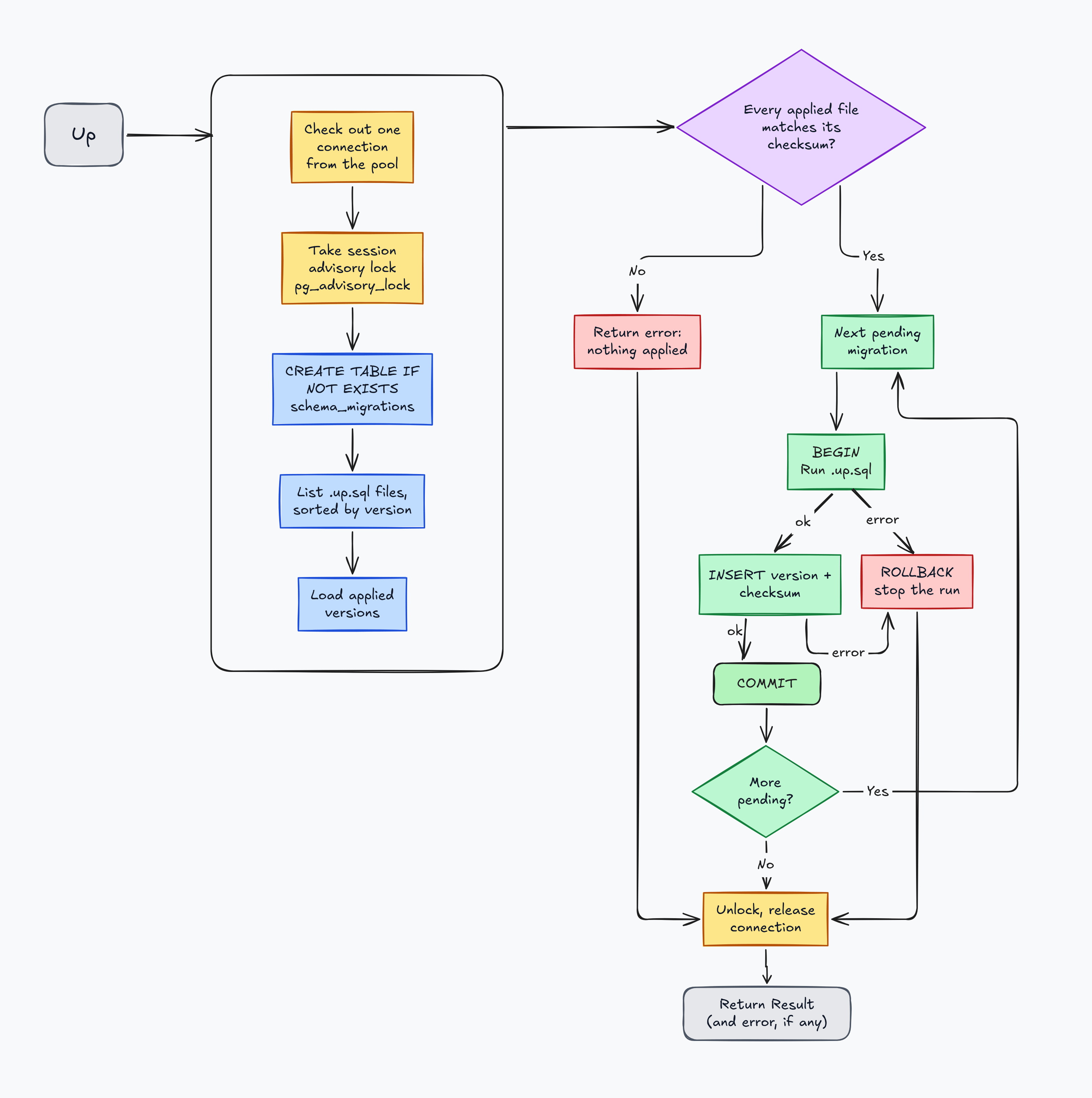
When you call Up, here is what happens, in plain steps:
- Vow checks out a connection from the pool and takes the advisory lock on it, so no other instance can migrate at the same time.
- It makes sure the tracking table exists.
- It lists the migration files in number order and loads the versions already recorded.
- It re-reads every already-applied file and verifies its checksum.
- For each pending migration, it runs the SQL and records the version and checksum in a single transaction.
- It releases the lock, returns the connection, and gives you a
Result.
The answer comes back as a Result:
type Result struct { Versions []string // migrations applied (Up) or rolled back (Down), in order Skipped int // already-applied migrations left untouched Duration time.Duration // total wall-clock time for the run}If migration 3 of 5 fails, Result still tells you what did succeed before the error, so check both return values, not just the error:
result, err := migrator.Up(ctx)if err != nil { log.Printf("migration run failed after applying %v: %v", result.Versions, err) return err}log.Printf("applied %d, skipped %d, took %s", len(result.Versions), result.Skipped, result.Duration)That’s the basic idea. The interesting parts are steps 1 and 3, so let’s go through those.
Two instances, one database
Here is the problem I started with. Say you deploy your service and your platform starts three copies of it at the same moment. Each copy runs Up on startup.
Without any protection, this is what can happen:
- Instance A looks at the tracking table and sees that migration 3 is not applied.
- Instance B looks at the tracking table and sees the same thing.
- Both start running migration 3.
At best, one of them crashes at startup because the table or column already exists. At worst, both succeed and you get duplicate data, or a half-finished change.
This kind of bug is called a race condition. Both instances did “check, then act”, and the state changed between the check and the act.
sequenceDiagram
participant A as Instance A
participant B as Instance B
participant DB as Postgres

rect rgba(239, 68, 68, 0.15)
Note over A,DB: Without a lock
A->>DB: read tracking table
B->>DB: read tracking table
DB-->>A: migration 3 pending
DB-->>B: migration 3 pending
A->>DB: run migration 3
B->>DB: run migration 3
Note over A,B: duplicate work, or one instance fails at startup
end
The fix: an advisory lock
PostgreSQL has a feature for exactly this, called an advisory lock.
A normal lock protects something in the database, like a row or a table. An advisory lock doesn’t protect anything on its own. It’s just a lock with a name (really a number) that your application agrees to respect. If one connection holds it, any other connection that asks for it has to wait.
That makes it perfect for “only one instance may migrate at a time”. Every instance asks for the same lock before it does anything. One gets it. The others wait.
Vow’s default lock name is vow:migrations. Postgres identifies advisory locks by number, so Vow turns this name into one. You can change the name with WithLockName, which helps if you keep different sets of migrations in one database and don’t want them to block each other.
Here is what happens with the lock in place:
- Instance A takes the lock and starts applying migration 3.
- Instance B asks for the lock and waits.
- Instance A finishes, records migration 3, and releases the lock.
- Instance B gets the lock, looks at the tracking table, and sees there is nothing left to do. It skips everything and moves on.
sequenceDiagram
participant A as Instance A
participant B as Instance B
participant DB as Postgres

rect rgba(34, 197, 94, 0.15)
Note over A,DB: With an advisory lock
A->>DB: pg_advisory_lock(hashtextextended('vow:migrations', 0))
DB-->>A: lock acquired
B->>DB: pg_advisory_lock(hashtextextended('vow:migrations', 0))
Note over B,DB: B waits
A->>DB: apply migration 3, record it
A->>DB: pg_advisory_unlock(hashtextextended('vow:migrations', 0))
DB-->>B: lock acquired
B->>DB: read tracking table
DB-->>B: migration 3 already applied
B->>DB: pg_advisory_unlock(hashtextextended('vow:migrations', 0))
Note over B: applied 0, skipped 3
end
That last step is what the Skipped count in Result is for. Instance B’s run says “applied 0, skipped 3” and the service starts normally.
One detail that’s easy to miss: an advisory lock belongs to a database connection, not to your program. With a connection pool, that means the lock has to be taken and released on the same connection, and that connection must stay checked out for the whole run.
Vow handles this by checking out a single connection from the pool and holding it for the whole run. The advisory lock, the checksum checks, and every migration transaction use that same connection. When the run ends, Vow unlocks on it before releasing it back to the pool. The unlock uses a fresh five-second context, so a canceled request can’t strand the lock, and if the process dies, Postgres releases the session-level lock when the connection drops.
Immutability: applied migrations can’t change
The second safety feature is the one I find most interesting.
Here is a scenario. Your team applies migration 5 to staging and production. A week later, someone notices a mistake in the file and just edits it, adding a missing column. The file in the repo is now different from what was applied.
What happens next? Staging and production never run the new version, because they already marked migration 5 as done. But a brand new database, say a new teammate’s laptop, will run the edited version. Now you have databases that look different, and nothing in your system tells you. This is called schema drift, and it’s a nasty thing to debug.
Vow prevents this with checksums. When a migration is applied, Vow stores a SHA-256 hash of its .up.sql file next to its version in the tracking table. On every Up or Down run, before it applies or rolls back anything, Vow re-reads every already-applied file and compares its hash with the stored one.
If a file was edited or deleted after it was applied, the run fails right away, before it touches the database any further.
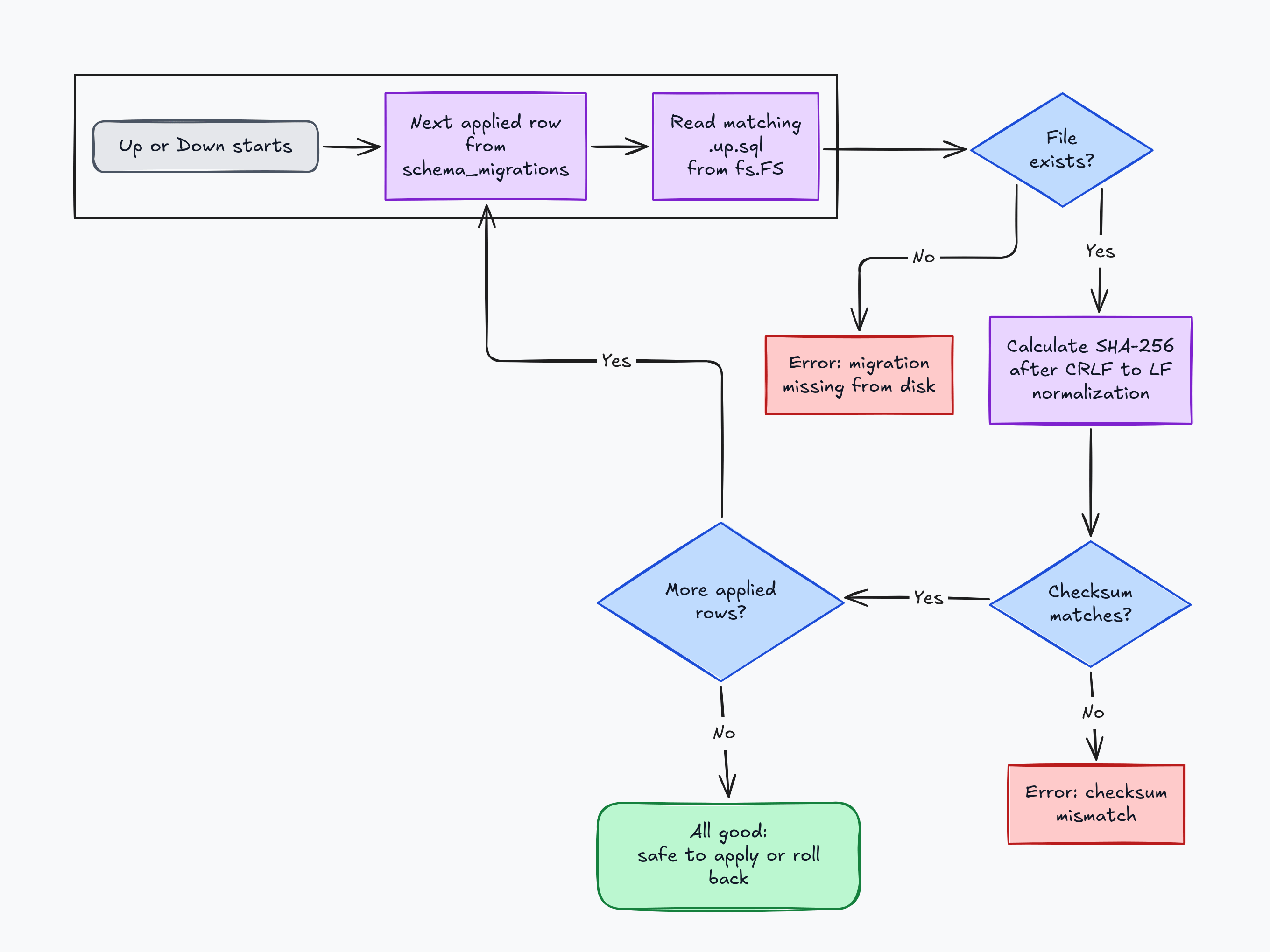
The rule this creates is simple: once a migration is applied, it’s history. If you need to change something, write a new migration.
A checksum catches more than a plain file name check would. If I only tracked names, someone could change the contents of a file and nobody would notice. With a hash, any content change is caught. Line endings are the one exception: Vow normalizes CRLF to LF before hashing, so a checkout on Windows doesn’t look like drift.
Why .down.sql files are not checksummed
You might wonder why Vow doesn’t do the same for the down files. This was a deliberate choice.
When a migration is rolled back, Vow deletes its row from the tracking table. After that, there is no stored record left to compare against, so there is nothing that can drift. Also, rollbacks often happen because a migration needs to change, so I wanted down files to stay free to edit.
This also means changes to a down migration aren’t protected by checksum verification, so they should be reviewed carefully before executing a rollback.
Rolling back, and what I chose not to automate
Every migration has a .down.sql file, and Down uses them:
result, err := migrator.Down(context.Background(), 1)if err != nil { log.Fatalf("rollback failed: %v", err)}log.Printf("rolled back: %v", result.Versions)Down rolls back the last N applied migrations, in reverse order. For each one it runs the .down.sql file and removes the tracking row in a single transaction, so each step is all-or-nothing. Down as a whole is not one transaction: if the second of three rollbacks fails, the first stays rolled back. If you ask for more steps than there are applied migrations, Vow just rolls back everything and stops. It doesn’t treat that as an error.
There are two rules here that I want to be honest about.
Down migrations are best effort. A down file can undo the shape of a change, like dropping a column it added. But it can’t bring back data. If the up migration dropped a column, the down migration can add the column back, but the data that was in it is gone. Write and review your down files with that in mind.
Up never calls Down by itself. If a migration fails halfway through a deploy, Vow stops and fails loudly. It does not try to roll back automatically. A failed deploy is a bad moment for a tool to try a risky undo that nobody has checked. I’d rather leave that decision to a person: fix it forward with a new migration, or roll back by hand.
Because of this, I see Down as a tool for local development and test cleanup, not for automatic recovery in production.
Other design decisions
Only pgx. Vow’s only dependency is pgx/v5, and I deliberately didn’t add a database/sql compatibility layer. Supporting every database driver would have made the code bigger and made it harder to use Postgres features properly. I wanted to do one thing well.
It takes an fs.FS, not a path. Vow accepts any fs.FS, which means your migrations can be real files on disk, or they can be compiled into your binary with //go:embed. Embedding is useful when your migrations ship together with your app, because the binary doesn’t need a migrations/ folder next to it.
There is one catch, and it’s easy to trip on. Vow always assumes the file system you give it is already rooted at the migrations folder. os.DirFS("./migrations") is rooted correctly. An embedded file system is not, because //go:embed migrations/*.sql keeps the migrations/ folder name in the path. So you need fs.Sub first:
//go:embed migrations/*.sqlvar migrationFS embed.FS
func newMigrator(pool *pgxpool.Pool) (*vow.Migrator, error) {    rooted, err := fs.Sub(migrationFS, "migrations")    if err != nil {        return nil, err    }    return vow.New(pool, rooted)}
I made that choice so the rooting decision happens in exactly one place, when you create the migrator, instead of being repeated on every call.
Options as functions. Settings like the table name, the lock name, and the logger are passed as functional options, which is a common Go pattern:
migrator, err := vow.New(dbPool, os.DirFS("./migrations"), vow.WithTableName("app_schema_migrations"), vow.WithLogger(myLogger), vow.WithLockName("my-app:migrations"),)Code first, CLI second. Vow started as just a library. Later I added a small command line tool, mostly for local development, where running migrations by hand is easier than writing a throwaway program:
go install github.com/md-talim/vow/cmd/vow@latest
DATABASE_URL=postgres://user:pass@localhost:5432/mydb vow up# applied 2, skipped 0, took 45ms
vow down 3    # roll back the three most recent migrations
The bug that broke every restart
I shipped Vow v0.1.0 with a bug, and a couple of days later I had to release v0.1.1 to fix it.
The bug: running Up a second time on the same database failed. I noticed it after I used it in dhara and ran tests in dhara.
The cause was a small mismatch. Vow’s tracking table stores the migration name without the suffix, like 000001_test. But the code that decides which migrations are still pending compared that stored name against the full file name, 000001_test.up.sql. They never matched, so every migration I had already applied looked new again. Vow tried to apply it a second time and failed with a duplicate key error on the tracking table.
That is worse than it sounds. A second run of Up is not a rare case. It is what happens every time a service restarts if it migrates on startup. A migration runner that can’t be run twice is not much use.
The fix was one line, adding the suffix back when loading the applied versions:
// before: returned the stored version as it isapplied[version] = struct{}{}
// after: match what the pending check compares againstfilename := fmt.Sprintf("%s.up.sql", version)applied[filename] = struct{}{}
Why didn’t I catch it earlier? My only test ran Up once and then Down. Nothing ever ran Up twice. So I added a test that runs Up twice on the same database, and checks that the first run applies the migration and the second run skips it. It’s still in the repo as a regression test.
This also ties back to the lock. The Skipped count is not just a nice number in Result. It’s what makes the lock useful. When Instance B finally gets the lock, it only behaves because a second run knows to skip what is already applied.
The lesson I took from this: test the second run, not just the first.
How I tested it
A migration runner is all about what happens inside a real database, so I didn’t mock anything. The tests run against a real PostgreSQL, with Docker Compose on my machine and a Postgres service container in CI.
While writing this post, I went through everything I claimed and made sure a test backs it up.
Running Up twice is safe, failed migrations roll back cleanly, edited or deleted applied migrations are caught, and the advisory lock is released after success, failure, and context cancellation.
The test I care about most is the concurrency one. It starts five separate instances at the same time, on a migration that takes a second, and checks that exactly one applies it and the other four skip it. A race is hard to trust from a single run, so I run it many times with Go’s race detector on.
Then I commented out the lock and ran it again, and it failed. That’s when I believed the lock was really doing something.
You can find the integration tests and the individual cases in the repository.
What’s next
Vow is still a young library, and for now I’m happy with what it does: find migrations, check them, and run them safely. I’m using it in my own projects first, and I want to see where it breaks before calling it stable.
There is a bigger problem I’ve started reading about, and I’m not sure yet if Vow is the right place for it: running migrations against production databases that are actively serving traffic.
On my laptop, a migration takes milliseconds. On a table with millions of rows, the same migration can hold a lock for minutes or put heavy load on the database while real users are waiting. Backfilling a large table, changing a column, or adding an index are where things get risky.
Vow already runs into a small version of this limitation. Because every migration currently runs inside a transaction, it cannot execute operations like CREATE INDEX CONCURRENTLY, which PostgreSQL provides for building indexes without blocking concurrent writes.
Some things I’d like to explore are batched backfills, resumable migrations, progress tracking, the expand-and-contract pattern (add the new thing first, move over, then remove the old thing), and pausing execution when the database looks overloaded.
I don’t know yet how much of this belongs in a small library, and I don’t want to make Vow huge just because I can. I want to understand the problem first, and I’ll probably write about it as I learn.
If you’ve run migrations on a live production database, I’d love to hear what went wrong, or what you wish your migration tool did.
If you read my Dhara post, thank you. This is the second piece of that story, and Vow is still where my “from scratch” habit paid off the most. If you spot a flaw in the design, or have an idea for something Vow should do, I’d genuinely love to hear it.
The code is on GitHub at Md-Talim/vow. Follow along on X / talimbuilds for what I’m building next.