I built Dhara, a distributed task queue for Go, using PostgreSQL as the only queue and source of truth. No Redis, no Kafka, no RabbitMQ.
In this post I’ll cover why I built it, how a task moves through the system, the design decisions that mattered (transactional enqueue and FOR UPDATE SKIP LOCKED), a performance bug that made my queue 8x slower than it should have been, and what I’m building next.
Code: github.com/Md-Talim/dhara
Why I built a distributed task queue
Honestly, I don’t remember exactly why I decided to build this.
What I do remember is how I got there. I’d been asking AI models about my next project with very vague prompts like “give me hard backend engineering project ideas”, and since the model had my past context and history, it kept giving me a lot of ideas. Two of them showed up every single time:
- a distributed task queue
- a distributed task orchestration system
By then I had already built Redis, a shell, an HTTP server, an interpreter, and some parts of Git, all from scratch, as part of the CodeCrafters challenges. I’m very fond of building things from scratch to understand them better, and I like taking on hard challenges. So building a task queue from scratch felt like the obvious next exercise.
It turned out to be one of the best decisions I’ve made. I learned about concurrency, failure handling, a few core ideas of distributed systems, designing client-side APIs, transactions, and I did a hell of a lot of debugging along the way.
What a task queue actually is
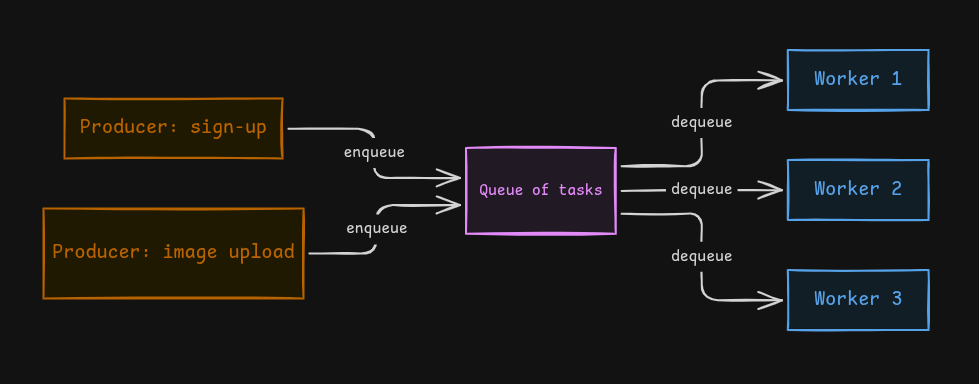
A task queue is, well, a queue of tasks that need to be executed.
Why do we need one? Because not every piece of work needs to happen during the client’s request. Some work can be done later, or on a schedule. For performance and a good user experience, anything that can run asynchronously should.
A few examples:
- sending a welcome email after sign up
- processing images
- converting an uploaded video into different resolutions (like YouTube does with 480p, 720p, and so on)
The mental model is just the queue data structure you already know. Producers insert tasks at the back (enqueue), and workers take them out from the front when it’s time to execute them.
The architecture and how a task moves through the system
When I started this project, I had very little idea of what a task queue actually was. I hadn’t used a real one in any of my projects either. Plenty of task queues are built on top of Redis or a message broker like Kafka, but I decided to do it all from scratch (I’ll explain what “all” means later in this post).
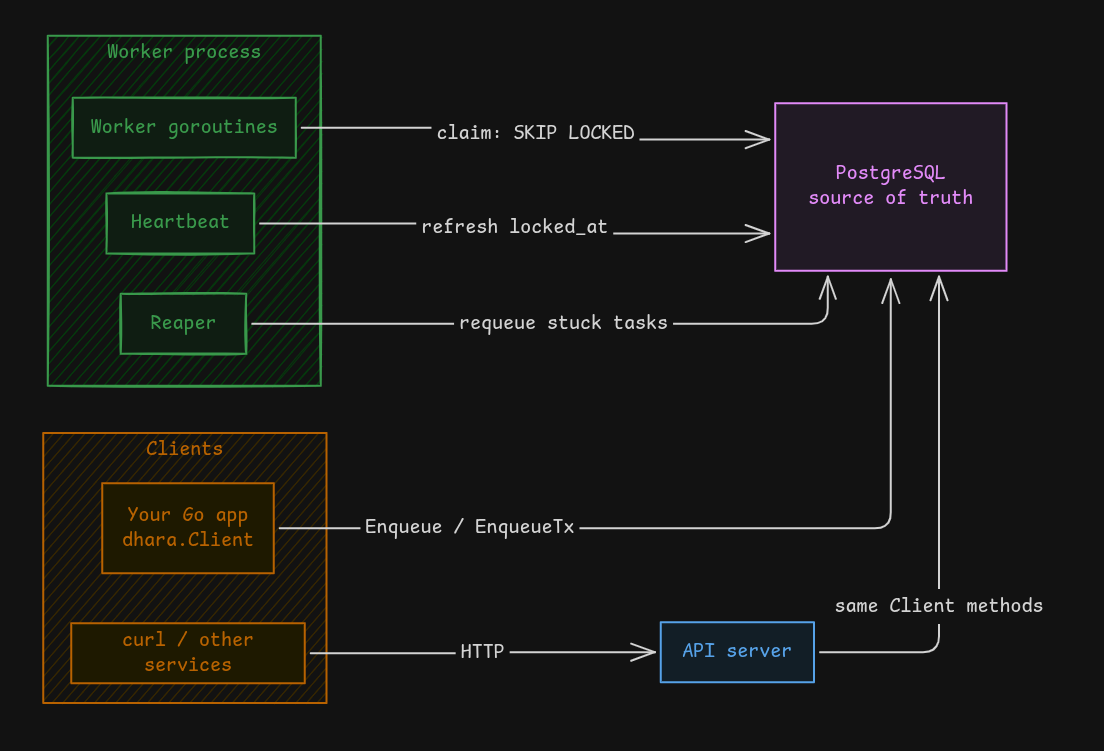
A basic task queue needs these components:
- Tasks: the actual units of work. Each task has a name (type) and a payload, and each type has a handler that knows how to execute it.
- Queue: where tasks are inserted, and where they wait until it’s time to execute them. I used PostgreSQL as the queue.
- Workers: they take tasks out of the queue and run the matching handlers. In my implementation workers are simple goroutines, but they can be deployed separately too. This is also where most of the “distributed” part lives.
Then there are the components that take it from a toy to something closer to production grade:
- Reaper: a separate background process (a goroutine here) that finds tasks stuck on a dead worker and puts them back in the queue so they can run again.
- API server: we need a way to talk to the system: create tasks, list them, cancel them, retry them. My first version was only an HTTP server.
- Client library: the other way to use Dhara is to import it in your Go code and manage tasks with function calls. Ease of use wasn’t my main reason for building it, though. It was about transactions, and it ended up changing the whole design. I’ll get to that in the section on
EnqueueTx.
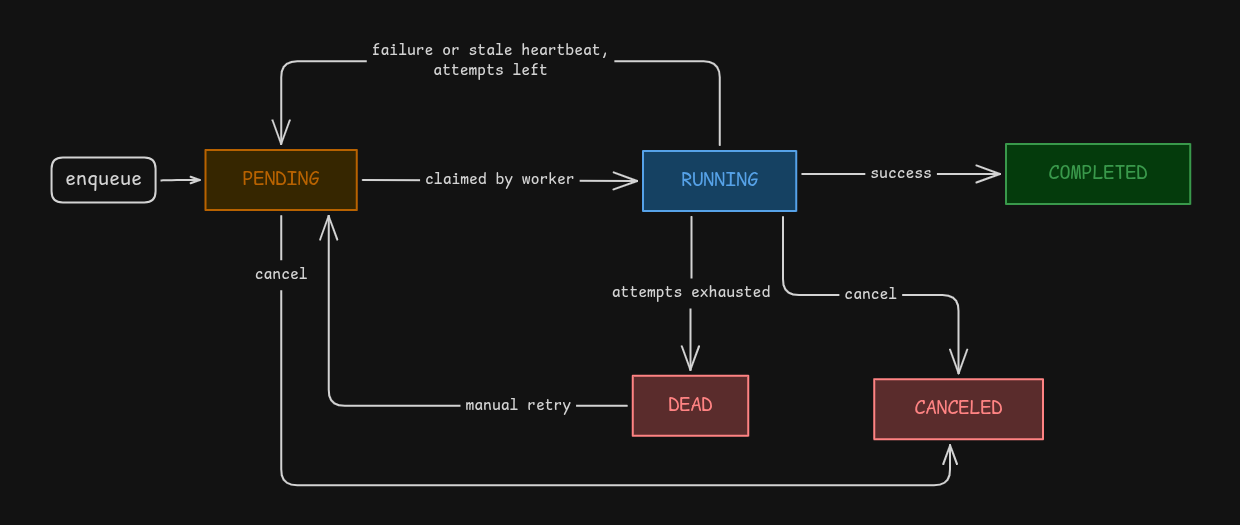
A task goes through a few states in its life:
- It’s created as
PENDING(via the API or the client library). - A worker claims it and it becomes
RUNNING. - If the handler succeeds, it’s
COMPLETED. - If the handler fails (or the worker dies), it goes back to
PENDINGto be retried, until it runs out of attempts, and then it’sDEAD. - A task can also be
CANCELEDthrough the API while it’s pending or running.
PostgreSQL as the source of truth
I used Postgres for two main reasons:
- I knew Postgres.
- The way I designed the whole system, it solves a very real problem.
Using PostgreSQL as the only queue was a deliberate decision. To understand the problem, imagine I had used Kafka instead. Take an e-commerce example. The typical flow would be:
- The client performs some business logic (a sign up, a product order).
- The client saves the data in their own database in a transaction (user details, order details, and so on).
- The client publishes a message to a Kafka topic like “send confirmation email”, which a consumer later picks up and turns into an actual email.
See the problem? Steps 2 and 3 talk to two different systems, and there’s no transaction that covers both. This is known as the dual write problem. When one of them fails, you get:
- The database transaction fails, but the Kafka publish succeeds: the user gets an email for an order that doesn’t exist.
- The database succeeds, but the Kafka publish fails: the order exists, but no email goes out, and the user is left wondering whether the order was even placed.
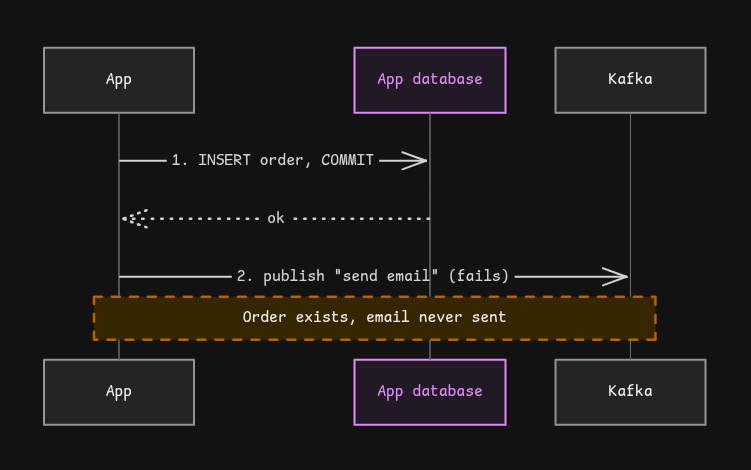
This is the problem Postgres solves here. If the task is just a row in the same database as your business data, then inserting the task can be part of the same transaction as your business queries. Either both commit, or neither does. This pattern is usually called the transactional outbox, and Dhara basically bakes it into the queue itself.
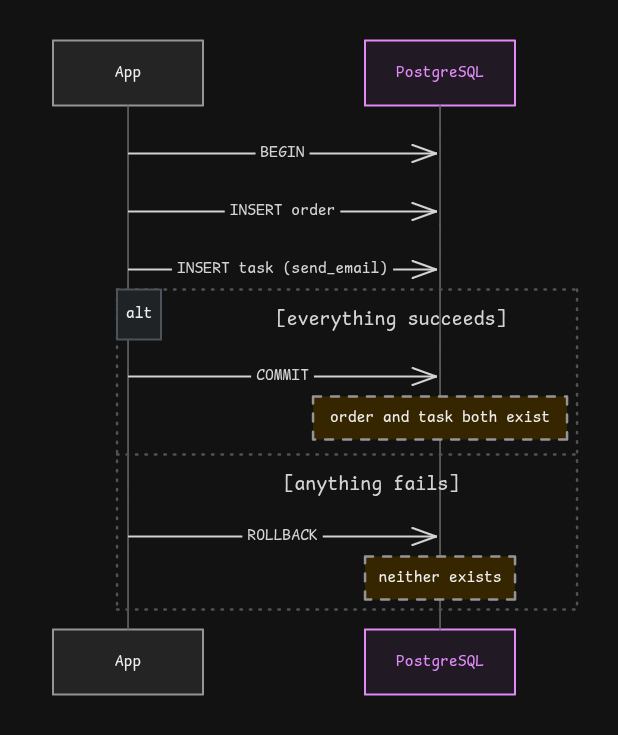
Of course there’s a trade-off. Postgres isn’t a purpose-built message broker, so it won’t match Kafka’s raw throughput. But for the vast majority of applications, correctness here matters way more than squeezing out the last bit of throughput.
Atomic task claiming with FOR UPDATE SKIP LOCKED
The next problem every task queue has to solve: when multiple workers are pulling from the same queue, how do you make sure a task isn’t claimed concurrently by multiple worker?
This is a serious problem. If two workers get the same task, that task runs twice, and you can imagine what happens when the task is “charge the customer”.
This is where pessimistic locking comes in, and the nice part is that I didn’t need a separate lock service. Postgres gives it to us:
FOR UPDATE: locks the selected rows. If another transaction already holds the lock, it blocks until the lock is released, and then re-evaluates the row to make sure it still matches the query.SKIP LOCKED: this is the one I used (FOR UPDATE SKIP LOCKED). Instead of waiting, it simply skips the rows that are already locked.
With plain FOR UPDATE, 20 workers would all line up behind the same row, waiting on each other. With SKIP LOCKED, each worker just grabs the next task that nobody else has touched. (The Postgres docs even call out queue-like tables as the use case for this.)
Here’s a simplified version of what claiming looks like:
UPDATE tasks
SET
    status = 'RUNNING',
    locked_by = $1,
    locked_at = now(),
    started_at = now(),
    attempts = attempts + 1,
    updated_at = now()
WHERE id = (
    SELECT id FROM tasks
    WHERE status = 'PENDING' AND run_at <= now()
    ORDER BY priority DESC, run_at ASC
    LIMIT 1
    FOR UPDATE SKIP LOCKED
)
RETURNING id, type, payload, attempts, max_retries, idempotency_key;
Once a worker claims a task, another worker can’t concurrently claim that same pending task. And a worker never sits waiting on a locked row; it just gets one of the tasks that isn’t already taken.
Worker concurrency, retries, and stale-task recovery
Workers
Workers are goroutines: lightweight units of execution in Go, very cheap to start (even compared to a thread). Each worker is its own goroutine, and the loop looks like this:
- Try to claim a task.
- If one is found, execute it, then immediately try to claim the next one.
- If none is found, wait for the poll interval (1 second by default, configurable) and try again.
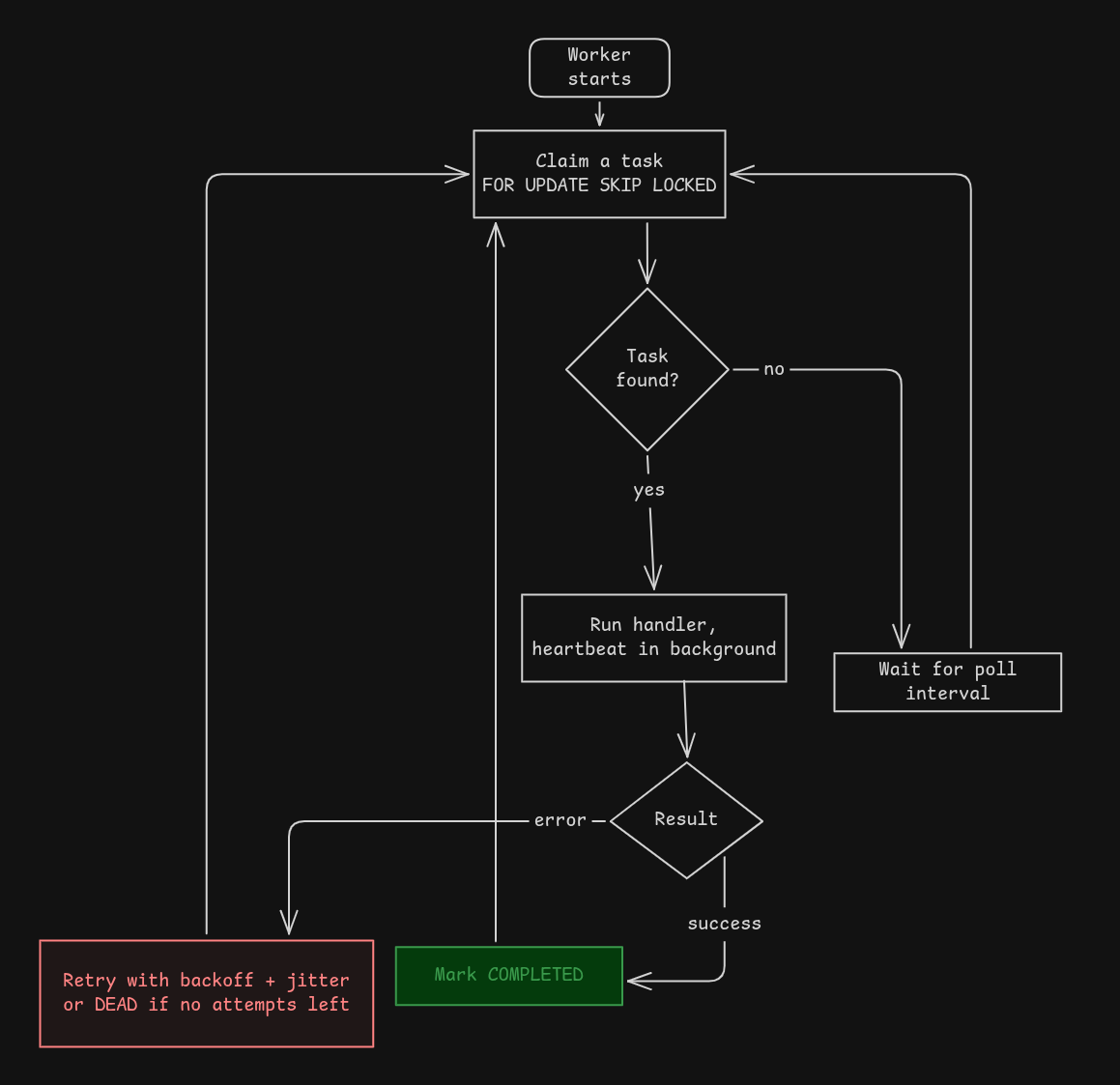
Note that this is a polling mechanism: every worker keeps asking the database “anything for me?”. Next on my list is a push mechanism using Postgres LISTEN/NOTIFY, which is another reason I picked Postgres over other databases.
Retries
In distributed systems you can’t avoid failures, so you design the system to keep working even when things fail. In Dhara there are a few mechanisms for that.
When a task fails for any reason (the handler returned an error, the worker crashed, a database or network call failed), it gets retried. Each time a worker claims a task, the attempt count goes up, and the task can be retried until it hits the max number of attempts (configurable).
Retries use exponential backoff with full jitter. The backoff gives a struggling downstream service some breathing room, and the jitter randomizes when each retry fires, so a thousand failed tasks don’t all come back at the exact same second (the “thundering herd” problem). When a task runs out of attempts, it goes to the DEAD state, and you can manually retry it through the API.
Heartbeats and the reaper
What if the worker doesn’t fail gracefully, and just dies in the middle of a task? Nothing returns an error. The task just sits in RUNNING forever.
That’s where heartbeats come in. While a handler is running, a background goroutine periodically sets locked_at and updated_at to now() for that task (matched by task id and worker id). It’s basically the worker saying “still alive, still working on it”.
If the worker dies, the heartbeat stops. Then the reaper, which scans on an interval, looks for RUNNING tasks that haven’t had a heartbeat within the stuck threshold. It puts those tasks back to PENDING so another worker can claim them, or moves them to DEAD if they’re out of attempts.
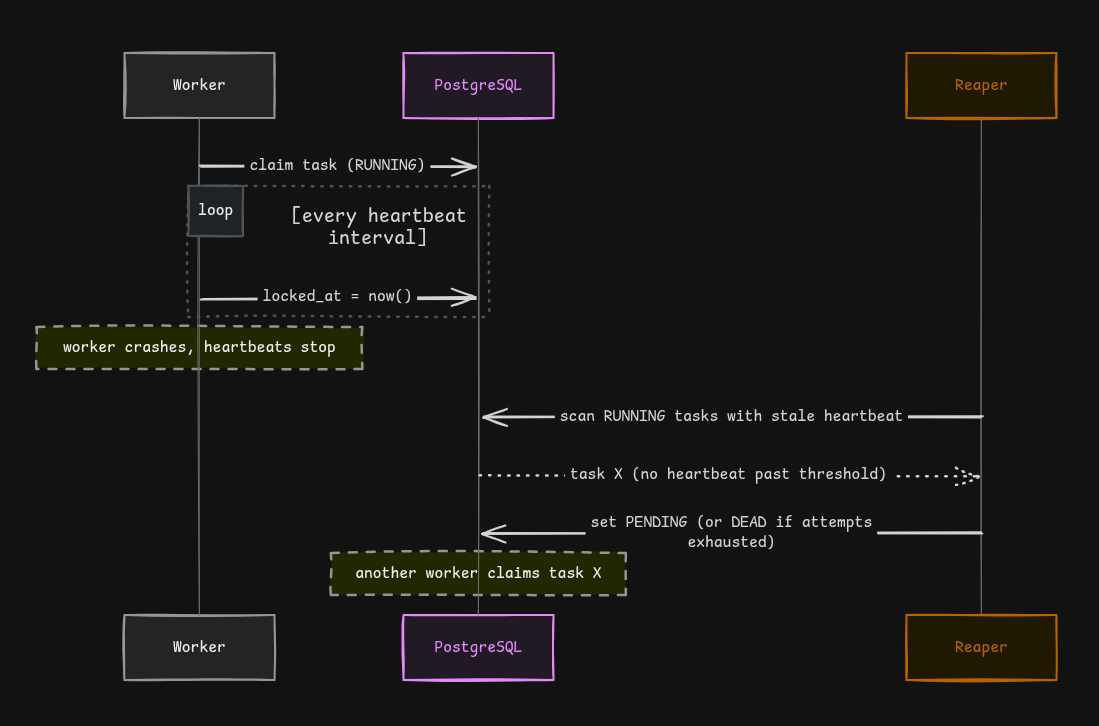
One important consequence: Dhara gives at-least-once execution. A worker could do half of the work (say, send the email) and die before marking the task as done. The reaper will requeue it, and it will run again. So handlers should be idempotent, meaning running them twice should be safe. This is also why I added idempotency keys at enqueue time, so the same enqueue request replayed twice doesn’t create two tasks.
Graceful shutdown
When Dhara receives SIGINT or SIGTERM, workers stop claiming new tasks and give in-flight tasks a configurable amount of time to finish. After that, the connection pool is drained. Without this, every deploy would kill running tasks mid-way and leave the reaper to clean up the mess.
What “from scratch” actually meant
Earlier I said I decided to do it all from scratch. Here is what I meant.
Dhara has only three dependencies:
pgx, the PostgreSQL drivergoogle/uuid, for generating UUIDsvow, my own database migration runner
Everything else is the Go standard library. The HTTP API runs on net/http, so there is no web framework or router. Logging uses slog. The Prometheus metrics endpoint is also written by hand, without the official client library. The format is just plain text: a couple of comment lines describing each metric, then a line with the metric name and its current value. Counters like tasks_enqueued_total and gauges like tasks_by_status are only a few lines each.
The migration runner is the best example of this. Dhara needed a way to set up its database tables, and instead of picking an existing tool, I built one. It started as a small part of Dhara and grew into a project of its own: Vow. It runs your SQL files in order, uses PostgreSQL advisory locks so two instances of a service can’t migrate at the same time, and refuses to run if an already applied migration was renamed or deleted. Dhara’s migrations run through Vow. I’ll write about what I learned about database migrations in a separate post.
I’m not saying you should build everything yourself. I didn’t write a Postgres driver or a UUID generator. I just built the parts I was curious about, and used libraries for the rest.
Benchmarking and what the results taught me
I’d seen people use throughput and latency numbers as evidence that a backend project was serious.
I didn’t know how to benchmark a system like this, so I took some help from AI to set up k6 load tests against the HTTP API. The important part is that I didn’t just trust HTTP response codes. I used Postgres as the source of truth for what actually happened to each task.
Setup: 20 workers, a handler that simulates 50-200ms of I/O, a laptop with an i3 (11th gen) / 8GB RAM / 500GB SSD, and a max of 25 database connections.
Finding a real bottleneck
Before running anything, I did the math. 20 workers, each finishing a task in ~125ms on average, should give roughly 160 tasks/sec.
The first measured result: ~20 tasks/sec.
That’s 8x lower than expected, so something was wrong. The cause was in my claim loop. A worker only attempted one claim per poll tick, no matter how quickly the task finished:
select {
case <-ticker.C:
    processNext(ctx)
}
So 20 workers × 1 claim per second (the 1s poll interval) = 20 tasks/sec. The math matched the measurement almost exactly. A worker would finish a 100ms task and then sit idle for the remaining 900ms.
The fix: keep claiming continuously while there’s work available, and fall back to the poll interval only when the queue is empty. After the fix: ~148 tasks/sec, within a few percent of my original prediction.
Results
| Submission rate | Worker utilization | p50 | p95 | p99 | Task loss |
|---|---|---|---|---|---|
| 100 tasks/sec | ~67% (headroom) | 181ms | 299ms | 380ms | 0 / 6,001 |
| ~148 tasks/sec | ~100% (saturation) | 1.30s | 2.03s | 2.06s | 0 / 9,001 |
Latency here is end-to-end (completed_at - created_at), not just how long the HTTP enqueue took.
What this taught me
- Measure the thing that matters, not the thing that’s easy to measure. Enqueue latency stayed under 10ms (p99) in every run, even the one that was bottlenecked at 20 tasks/sec. If I’d only looked at HTTP response times, I would have thought everything was fine. I only caught the bug by checking task state in Postgres.
- Predict before you measure. Having a number in my head (~160/sec) is the only reason I knew 20/sec was wrong. Without a prediction, I might have just accepted it.
- Saturation is not failure. At ~148 tasks/sec the latency jumps, but that’s queueing delay from running at the edge of worker capacity, not broken correctness. Every run completed 100% of tasks. I also ran a burst test that deliberately oversubmitted (120 tasks/sec against the then-20/sec ceiling), and once workers caught up, the system fully drained a 5,800-task backlog with zero loss.
To be clear, I’m not claiming 148 tasks/sec is fast. It’s bounded by 20 workers and the handler’s duration, on a laptop, with a simulated handler. What matters to me is that the measured number matched the prediction, and that no task was lost. You can reproduce everything with the scripts in the benchmarks folder, including full methodology in RESULTS.md.
The decisions that changed my implementation
The poll loop
That’s the bug above. Benchmarks changed my worker loop, and it’s a good reminder that you don’t know how your concurrent code behaves until you load it.
Building the client library, and why EnqueueTx exists
My first version of Dhara only had an HTTP server. You POST /api/v1/tasks and the task gets created. Simple, language-agnostic, works.
But remember the whole reason I chose Postgres: the task insert should be atomic with the business writes. With an HTTP API, that’s impossible. Your application writes the order in its transaction, then makes an HTTP call, which inserts the task in another transaction on another connection. There’s no way to put both under one commit. If your app crashes between the two, you’re right back to the dual write problem I was trying to escape.
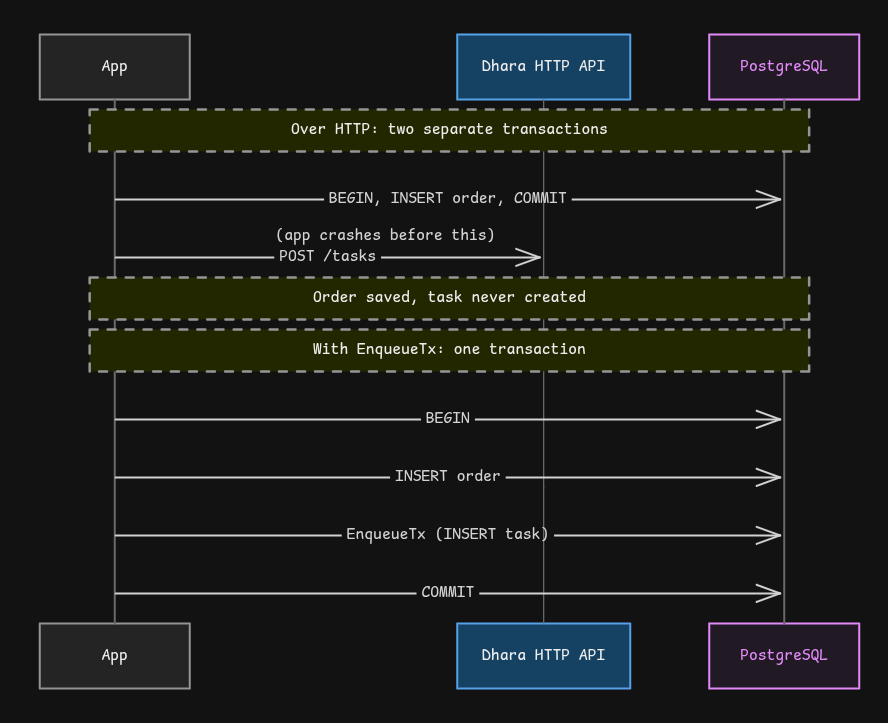
So I built a client library, and the key function is EnqueueTx. It takes your transaction:
tx, _ := pool.Begin(ctx)

// your business logic
tx.Exec(ctx, `INSERT INTO orders (id, total) VALUES ($1, $2)`, orderID, 42.00)

// the task is committed only if the order is
res, err := client.EnqueueTx(ctx, tx, "send_email", EmailPayload{
    To:      "user@example.com",
    Subject: "Order #" + orderID,
})

tx.Commit(ctx)
Roll back the transaction and the task never existed. Commit it and both are there, atomically.
Two details I’m happy with:
- Idempotent enqueue without poisoning your transaction. Enqueue uses
INSERT ... ON CONFLICT DO NOTHINGwith an idempotency key. In Postgres, a failed statement aborts the entire transaction, so if a duplicate insert raised an error, it would take down the caller’s whole transaction. Instead, a replay quietly returns the existing task, withDuplicate: true. - One code path. The HTTP server and the worker binaries are now thin wrappers built from the library. They can’t drift from it, because they are it.
What I’d build next
This project got me really interested in distributed systems, and in the finer details of concurrency and handling failures. So I’m going deeper: I’m taking MIT’s distributed systems course, reading the papers, going through the lectures, and implementing the labs.
The labs mainly come down to three things: MapReduce, a replicated and sharded key/value store, and Raft. I’m focusing on these for now, and the KV store and Raft will be my next flagship projects.
I should be honest about one thing: in Dhara, the workers scale out horizontally, but PostgreSQL itself is still a single point of failure unless you run it with replication and failover. Understanding how machines agree on shared state, even when some of them fail, is a big part of why I want to go through Raft properly.
For Dhara itself, the roadmap is:
- replacing constant polling with
LISTEN/NOTIFY, so workers get pushed new tasks instead of hitting the database every second - better dead-letter handling
- execution histograms and queue latency metrics
- more robust cancellation semantics
- richer operational dashboards
This project will keep evolving.
Terms and Concepts I had to look up and learn
Some of these I had never heard of before this project, and some I only knew by name. This is the list of terms I had to look up and properly understand while building Dhara.
- Dual write problem: when you write to two separate systems (like a database and Kafka) and there is no single transaction covering both, so one can succeed while the other fails.
- Transactional outbox: the fix for the dual write problem. You save the message or task in the same database transaction as your business data, so both happen or neither does.
- Idempotency: doing the same operation twice has the same result as doing it once.
- At-least-once delivery: a task is guaranteed to run at least one time, but it might run more than once.
- Pessimistic locking: locking a row before you work on it, so nobody else can touch it in the meantime.
FOR UPDATE: the Postgres clause that locks the rows you select. Other transactions have to wait for the lock to be released.FOR UPDATE SKIP LOCKED: the same, but instead of waiting, it skips the locked rows. This is what lets many workers pull from one queue safely.- Polling vs pushing: asking “anything new?” again and again, versus being told when something new arrives.
LISTEN/NOTIFY: the Postgres feature that lets the database push a notification to listeners. This is my next step for replacing polling.- Heartbeat: a small signal a worker sends regularly to say “I’m still alive”. When the signals stop, something is wrong.
- Reaper: the background process that finds tasks stuck on dead workers and puts them back in the queue.
- Exponential backoff and jitter: waiting longer after each failed attempt, with a bit of randomness added to the wait.
- Thundering herd: many clients all retrying at the exact same moment and overloading a system that was already struggling.
- Dead-letter queue: a place for tasks that failed too many times, so a human can look at them. In Dhara this is the
DEADstate. - Advisory locks: Postgres locks that are not tied to a row. I used them in Vow so only one instance runs migrations at a time.
- Percentile latency (p50, p95, p99): the time within which 50%, 95%, or 99% of requests finish. It shows you what the slow cases look like, which an average hides.
If you’ve read this far, thank you. The code is on GitHub at Md-Talim/dhara. If you spot a flaw in the design, I’d genuinely love to hear about it. I’m sharing all of this as part of my learning journey, so follow along on X / @talimbuilds for what’s next.